
Subscriber question:
"My Cessna 172S emergency checklist has some items in bold and others in a normal font. What’s the difference?" —Janet M.
Not subscribed yet? Sign up here to receive tips like this every week.
David:
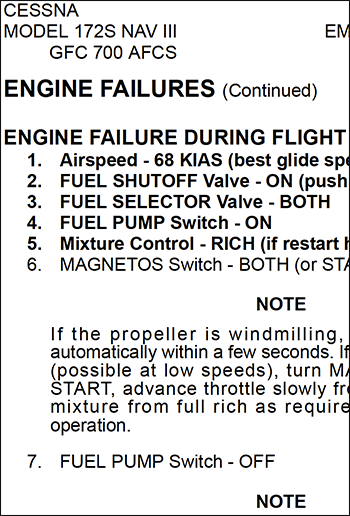 “The bold items result from extensive research into the human factors affecting the use of a checklist. Instead of requiring pilots to memorize every action for every checklist, the most important items on time-critical emergencies like an engine failure or electrical fire were placed in bold type (or in a red box, or with some other emphasis). These are the items to memorize and perform in an emergency before viewing the checklist. You can then consult the checklist to confirm all memory items were completed and then finish the remainder of the actions for that emergency by reading the checklist.
Emergencies that don’t present an immediate hazard, like an alternator failure, have no memory actions. So they have no bolded items in the emergency checklist.
Therefore, you must have embedded all of the bolded items for your airplane in your long-term memory so you can act without referencing the checklist. As soon as it’s safe and practicable, get the checklist out, start at the top to confirm you performed all memory items, and then complete the remaining actions. Emergency procedures with no bolded items mean you go right to the checklist before doing anything. That’s so you don’t make the situation worse with inappropriate or out-of-order actions conducted from memory.
I hope it goes without saying that the emergency checklist must be readily available to you in the pilot’s seat. It is a good idea to make a copy of all the POH checklists on laminated cards you can keep in the sidewall pocket or other easily accessible location.
Finally, I highly recommend that you periodically refresh your aircraft system knowledge by reviewing the airplane and systems descriptions in Section 7 of the POH. Understanding the systems can help you recognize abnormal system behavior before it becomes critical. There may also be procedures to mitigate risk in these situations, and the system descriptions will contain amplifying information, which can help you deal with the emergency scenario.”
Do you believe you could recite the bold items for any emergency checklist for your aircraft?