
Subscriber question:
"Why is there an option to 'Activate Approach' when that seems identical to just flying to an initial fix?" — Calvin R.
Bruce:
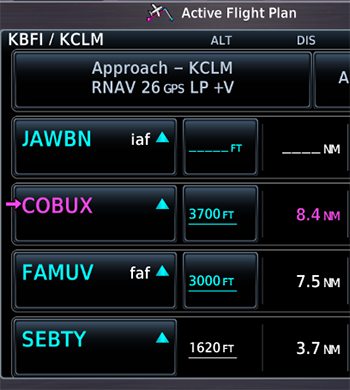 “Like many instructors, I’ve long explained that there’s nothing magic about the activate approach option on GPS navigators, going back to at least the Garmin GNS series. Selecting activate approach just tells the navigator to aim you directly at the initial fix (which Garmin calls a transition) that you chose when you loaded the procedure.
Activate approach has long caused confusion, and sometimes choosing that option leads to a ‘What’s it doing now?’ moment when the navigator directs the autopilot to turn back toward a fix that you’ve already passed or suggests a turn away from an ATC vector. Some pilots have even erroneously assumed that activating an approach in a GPS also switches the AP into APR mode.
A subtle update in the Garmin GTN Xi system software may reduce such misunderstandings. Beginning with system software version 21.12 (available via Service Bulletin 26101 Rev A released in late July 2026) Garmin is changing the text that appears after you load an approach. Now the button says, Activate Direct-To X, where ‘X’ is the transition you selected. If you choose the vectors-to-final (VTF) option instead of an initial fix, the button text says Activate VTF, not Load Approach & Activate.
This change reflects the long-standing advice that it’s generally better to ‘activate’ an approach by proceeding direct to an initial fix or activating a leg of an approach. Whenever the flight plan page shows that you’re navigating to a fix or joining a leg that appears below the procedure title, the approach is active and the navigator will sequence through the remaining legs of the procedure.
As you fly through the fixes below the procedure title, behind the scenes your GPS navigator validates the satellite signals, computes vertical and horizontal position errors, and completes other checks before it annunciates the best available minimums (for example, LPV, LP, or LNAV) and creates either an approved or advisory glidepath when appropriate. Those actions occur even if you never explicitly ‘activate’ an approach.
It’s always good practice to pause before pushing a button to confirm that you won’t fat-finger the wrong option, especially during a critical phase of flight. Perhaps this small change from Garmin will make us better aware of what really happens when you tell any navigation system—not just a Garmin GTN unit—that you want to begin an approach.”
With more and more GPS approaches having vertical guidance of some kind, it’s essential you have a clear strategy for +V advisory guidance that ensures you’ll meet crossing altitudes and MDA—yet still be in a position to land. Watch this video from PilotWorkshops “Garmin GTN: Next Level” online course, which is on sale today for $30 off.
Have you ever been confused by the term "activate approach" on an IFR GPS?